Selecting Track Material
Before audio and MIDI material can be edited, it must first be selected. The Track View determines how the material is viewed and selected.
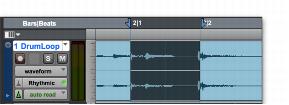
When you make a selection, it appears as a highlighted area of the tracks, and is also indicated by blue start and end arrows (Timeline Selection Markers) in the Main Timebase ruler. If any track (audio or MIDI) in the project is record-enabled, even if it is hidden, these markers appear red.
Timeline Selection Markers indicating Edit selection