Changing a Selection Length
The selection range can be shortened or lengthened. This does not affect the material within the selection.
To change the length of a selection, do one of the following:

With the Selector tool, position the cursor over one end of the current selection and Shift-click, or Shift-drag left or right.
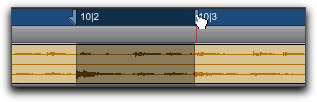
In the Main Timebase ruler, drag the Timeline Selection Marker for the selection’s start or end point.
Dragging a Timeline Selection Marker
To make a long-length selection:
1. With the Selector tool, click at where you want the selection to start.
2. Scroll to the end point and Shift-click at the point where you want the selection to end.
To verify the start and end points of a long selection, press the Left Arrow key to scroll to the beginning of the selection, or press the Right Arrow key to scroll to the end.