Tabbing to Transients
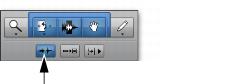
With the Tab to Transients button enabled, you can automatically navigate to transients in audio waveforms in Waveform view, placing the cursor just before the detected transient peak. This lets you define selections and play ranges, as well as start and end points for new clips, without having to zoom in on the waveform.
Tab to Transients button enabled
In Warp view, Tab to Transients tabs to all Event and Warp markers in a clip. Normal Tab tabs to clip boundaries and all Warp markers. In Analysis view, pressing Tab always tabs to Event markers, regardless of whether or not Tab to Transients is enabled.
For MIDI and Instrument tracks in Notes view, pressing Tab always tabs to the next note, regardless of whether or not Tab to Transients is enabled. In Clips view, Tab to Transients tabs to notes and Normal Tab tabs to clip boundaries.
For MIDI notes, when tabbing to chords, each note in the chord is recognized as a single event. This lets you tab to each note in the chord.
When Tab to Transients is enabled, the Tabbing function also locates the cursor to clip start and end points, but not to sync points.

To toggle Tab to Transients on and off, press Command+Option+Tab (Mac) or Control+Alt+Tab (Windows).
To set the start and end points of a selection with Tab to Transients:
1. In the upper left of the Edit window, click the Tab to Transients button so it becomes selected.
2. Click in the audio track just before the beginning of the material you want to select.
3. Press Tab repeatedly until the cursor locates to the transient where you want to start the selection.
If necessary, you can move to the previous transient by pressing Option+Tab (Mac) or Control+Tab (Windows).
4. Press Shift+Tab until the cursor locates to the end of the material you want to select.
To move the selection end point to the previous transient, press Option+Shift+Tab (Mac) or Control+Shift+Tab (Windows).
Once selected, the material can be looped for recording or playback, or it can be turned into a new clip with the Separate command.
Peak transients are usually visible in the waveform. However, some low-frequency transients may not appear as visible peaks in the waveform.