Using the Edit Selection Indicators (Start, End, and Length)
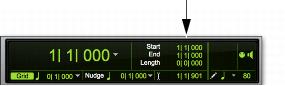
The Edit Selection indicators at the top of the Edit window can define precise Edit selections. Time values for the Edit Selection indicators use the time format for the Main Time Scale.
Edit Selection indicators
To make a selection with the Edit Selection indicators:
1. Click with the Selector tool in the track you want to select.
2. Click in the Start field at the top of the Edit window.
3. Type in the start point for the selection and press the Forward Slash key (/) to enter the value and automatically move to the end field.
4. Type in the end point for the selection and press Enter to accept the value.