Edit Window Toolbar Controls and Displays
The following controls and displays are available in the Edit Window Toolbar.
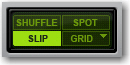
• Edit Modes
The Edit mode affects the movement and placement of audio and MIDI clips (and MIDI notes), how commands like
Copy and
Paste function, and also how the various Edit tools (Trim, Selector, Grabber, and Pencil tools) work. For more information, see
“Edit Modes” on page 284.
Edit mode buttons
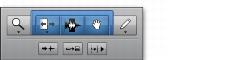
• Edit Tools
Edit tools are used for editing audio, MIDI, and automation data in Pro Tools. For more information, see
“Edit Tools” on page 288.
Edit tools
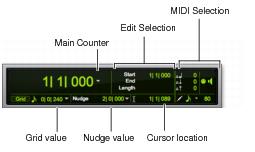
• Counters and Edit Selection Indicators
The Counters and Edit selection indicators provide information where selections are in the Timeline.
Edit window indicators
• Main Counter
Displays the current Edit insertion location in the Main Timebase ruler.
• Cursor Location
Displays the current cursor location in the Main Timebase ruler.
• Edit Selection Indicators
Display the Start, End, and Length of the current Edit selection.
• MIDI Selection Indicators and Controls
Display the current MIDI Edit selection (MIDI note number, and Note On and Note Off velocities) and provide controls for MIDI editing.
• Grid and Nudge
The Grid and Nudge selectors let you set the Grid and Nudge values for editing in Pro Tools. For information on the Grid Value selector, see
“Configuring the Grid” on page 287.