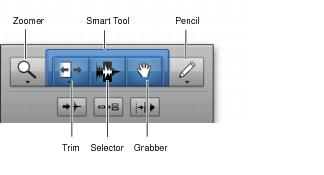
Edit Tools
Pro Tools provides the following Edit tools: the Zoomer, Trim, Selector, Grabber, Scrubber, and Pencil tools, and the multifunctional Smart Tool.
Zoom buttons and Edit tools
To select an Edit tool:

Click the icon for the tool you want in the Toolbar.
The Zoomer, Trim, and Pencil tools have multiple modes, which you can select from a pop-up menu when you click the tool.

You can use F5 (Zoomer), F6 (Trim), F7 (Selector), and F8 (Grabber), F9 (Scrubber), and F10 (Pencil) to select and toggle through the modes for each tool.
Press the Escape key to toggle through the Edit tools.
• Zoomer Tool
Use the Zoomer tool to select a zoom view in a track.
• Trim Tools
Use the Trim tools to trim clips and clip groups.
• Selector Tool
Use the Selector to make selections on tracks.
• Grabber Tool
Use the Grabber tool to select or move clips on tracks.
• Smart Tool
Use the Smart tool to Trim, Select, or Grab clips in tracks.
• Pencil Tool
Use the Pencil tool to draw automation and MIDI data.