Configuring the Grid
The actual Grid size, chosen from the Grid value selector can be based on a time value using the Main Time Scale; or, if the Follow Main Time Scale option is deselected, another time format can be used for the Grid size.
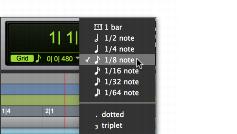
The Grid Value indicator and selector are located in the Edit window. Also, the Score Editor window and MIDI Editor windows each provide an independent Grid Value indicator and selector.
Grid Value indicator and pop-up menu
The Clips/Markers option in the Grid Value menu allows events to be placed freely (as in Slip mode), but they will snap to clip locations (start, end, and sync points), markers, and Edit selections when placed near them.

MIDI notes inserted with the Pencil tool ignore the Clips/Markers option, and instead snap to the time value selected in the Grid Value selector.