Edit Modes
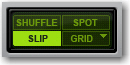
Pro Tools has four Edit modes: Shuffle, Spot, Slip, and Grid. Grid mode provides two modes of operation, Relative and Absolute. The Edit mode is selected by clicking the corresponding button in the upper left of the Edit window.
Edit mode buttons
The Edit mode affects the movement and placement of audio and MIDI clips (and MIDI notes), how commands like Copy and Paste function, and also how the various Edit tools (Trim, Selector, Grabber, and Pencil tools) work.

Use the Accent key ( ` ) to toggle through the Edit modes.