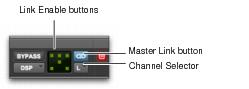
Multi-Mono Controls in the Plug-In Window
Plug-In window (multi-mono 1-Band EQ shown)
• Master Link Button
When enabled, links the controls on all channels of a multi-mono plug-in so that they can be adjusted in tandem.
• Link Enable Buttons
Let you selectively link or unlink the controls of specific channels of a multi-mono plug-in. Each square represents a speaker channel. The Master Link button must be disabled to use the Link Enable buttons.
“Linking and Unlinking Controls on Multi-Mono Plug-Ins” on page 654.
• Channel Selector
Accesses a specific channel within a multichannel track for plug-in control editing. This menu appears only on multi-mono plug-ins inserted on tracks with more than one channel. Shift-clicking this selector opens a separate Plug-In window for each channel of the multichannel track on which the plug-in is inserted.