Linking and Unlinking Controls on Multi-Mono Plug-Ins
When a multi-mono plug-in is used on a stereo track, the controls are linked by default. Adjusting the Gain control on one channel, for example, will adjust it for all channels.
You can unlink multi-mono plug-in controls on specific channels of a track and edit them independently. You can also selectively link the controls of specific channels.
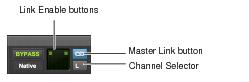
Channel selector and Link controls (shown with Link enabled)
To unlink controls on a multi-mono plug-in:

Deselect the Master Link button.
To access controls for a specific channel:
Select the channel from the Channel selector.
To link the controls of specific channels:
1. Deselect the Master Link button if it is not already deselected.
2. Click the Link Enable buttons for the channels whose controls you want to link.