Plug-In Inserts
An insert routes the signal from the track to an effect of your choice and automatically returns it to the same track. Inserts do not alter the original audio source files, but process audio in real time, during playback. You can permanently apply real-time effects to tracks by recording or exporting the audio mix (see
“Mixdown” on page 811 for more information).
Plug-In inserts are software inserts that process audio material on a track in real time. For example, the EQ, compressor, and delay plug-ins supplied with your Pro Tools system can be used as real-time plug-in inserts.
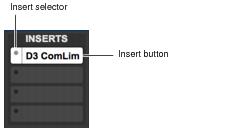
Insert button and selector on a track
Pro Tools | First provides up to four unity-gain inserts on each audio, Auxiliary Input, Master Fader, and Instrument track. Audio, Auxiliary Input, and Instrument track inserts are pre-fader, and Master Faders inserts are post-fader.
When more than one plug-in insert is used on a track, they are processed in series. Each effect is added to that of any previous inserts (flowing from top to bottom in the Mix Window Inserts view, and left to right in the Edit Window Inserts view).