Setting the Project Tempo
The tempo for projects defaults to 120 BPM. If you intend to record with a click at a tempo other than 120 BPM, make sure to set the tempo accordingly.

Tempo events, which can occur anywhere within a project, appear in the Tempo ruler. For more information on inserting and editing tempo events, see
“Tempo” on page 441.
To change the project tempo:
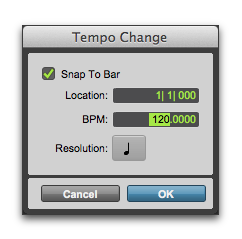
2. Enter the BPM value for the project.
You can type in a specific tempo, or you can use the T key to tap in the tempo.
3. Set the Location to 1|1|000 (to ensure that the inserted tempo event replaces the default).
Tempo Change window
4. From the Resolution pop-up menu, select the note value for the beat. (For example, if you are in 6/8, select a dotted-quarter note.)
5. Click OK.