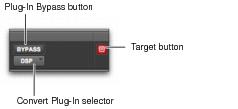
Additional Plug-In Controls in the Plug-In Window
Plug-In Map controls in the plug-in window
• Effect Bypass Button
Disables the currently displayed plug-in. This lets you compare the track with and without the effect.
• Convert Plug-In Selector
Lets you convert the insert from a DSP plug-in to a Native plug-in of the same type (or vice-versa). This feature can only be used on plug-ins that are available in both DSP and Native formats.
• Target Button
When multiple Plug-In windows are open, clicking this button selects that plug-in as the target for any computer keyboard commands.