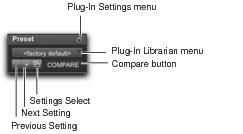
Preset Controls in the Plug-In Window
Preset controls in the plug-in window
• Plug-In Settings Menu
Lets you copy, paste, save, and import plug-in settings.
• Plug-In Librarian Menu
Recalls plug-in presets (plug-in settings files saved in the plug-in’s root settings folder).
“Plug-In Presets” on page 646.
• Next (+) and Previous (–) Setting Buttons
Let you select the next or previous preset from the Librarian menu.

You will lose the current settings if they are not saved before you use the Next and Previous Setting buttons. Always save your plug-in settings as a preset using the Plug-In Settings menu.
• Plug-In Settings Select Button
Accesses the Plug-In Settings dialog, which lists the presets for the selected plug-in. From this list, you can audition and select plug-in presets.
• Compare
Toggles between the original saved plug-in settings and any changes you have made to it so you can compare them.