Track Controls in the Plug-In Window
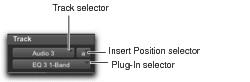
Track controls in the plug-in window
• Track Selector
Accesses any track in the project except MIDI tracks.
• Insert Position Selector
Accesses any insert on the current track.
• Plug-In Selector
Lets you select any real-time plug-in installed in the Plug-Ins folder (that is created when you install Pro Tools).
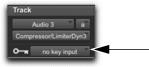
• Key Input Selector
Lets you select audio on a particular input or bus and route it to trigger the plug-in. This selector only appears on plug-ins that feature side-chain processing. Key inputs are monophonic.
Key Input selector (Dyn III Compressor/Limiter shown)
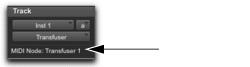
• MIDI Node Display
Shows MIDI node information for MIDI-enabled plug-ins. MIDI nodes are virtual connections from Pro Tools to software instruments and other MIDI-enabled plug-ins. MIDI nodes are useful for routing multiple MIDI tracks to different channels of a single virtual MIDI device. MIDI node numbers are also displayed in a track’s MIDI Output selector. The MIDI node indicator only appears in plug-ins that can receive MIDI.
MIDI Node Display indicator (Transfuser shown)