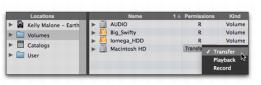
Volume Permissions
The Workspace includes a permissions column (Permissions) for Volume permissions. This column displays, and let you designate, whether a volume has permissions for Record, Playback, or Transfer of media files.
• R (Record and Playback)
Able to play audio files already on the volume, and record new audio files.
• P (Playback Only)
Can play audio files already on the volume, but cannot have new files recorded to it.
• T (Transfer)
Can only be used for storing, transferring, or auditioning files, and cannot be used for recording or playback.

If you have a Pro Tools system with multiple drives, and you intend to record multiple tracks simultaneously, you may want to designate the System drive as a Playback only or Transfer only drive for optimal performance.
To change a volume designator:
1. Open a Workspace browser.
2. In the Locations pane, select Volumes.
3. In the Browser pane, click and select the appropriate permissions for any volume.
You can also Right-click any volume in either the Locations pane or the Browser pane and set the desired permissions setting for the selected volume.
Designating a volume in the Workspace