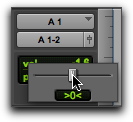
Pan Indicator
The Pan indicator displays the current pan setting of a track. Pan values range from <100 (full left) to 100> (full right). Pan controls are only available for stereo tracks or for mono tracks routed to a stereo output.
In I/O view (Edit window), click the Pan indicator to display the Pan pop-up slider, which can be used to adjust panning.
Edit window I/O view, Pan pop-up slider (audio track)