Deleting a Project
To delete a project:
1. In the Dashboard window, select Open to view your current projects (or if Pro Tools | First is already running, choose File > Open to access the Dashboard window.
2. Click the Open tab.
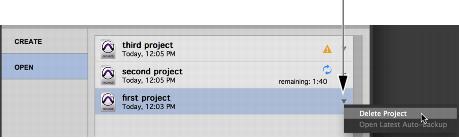
3. To the right of the project list, click the pop-up menu for the project you want to delete.
Dashboard, Delete Project
4. Choose Delete Project.
Pro Tools | First deletes the project and increments the number of new projects available to you by one.

You cannot undo the Delete Project command. Once you delete a project, it is permanently deleted and is unrecoverable.