Setting the Manual Tempo with the Tempo Slider
To set the Manual Tempo with the Tempo slider:
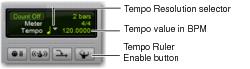
1. In the Transport window or the Edit window Toolbar, click the Tempo Ruler Enable button (Conductor) button so it becomes unhighlighted. Pro Tools switches to Manual Tempo mode. In this mode, any tempo events in the Tempo ruler are ignored.
Manual Tempo mode
2. To base the BPM value on something other than the default quarter-note, click the Tempo Resolution selector and select a different note value. (For example, if you are in 6/8, select a dotted-quarter note.)
3. To enter a new tempo, do one of the following:

Drag the Tempo value up or down. For finer resolution, press Command (Mac) or Control (Windows) while dragging.
Click the Tempo value, type a new number, and press Enter.