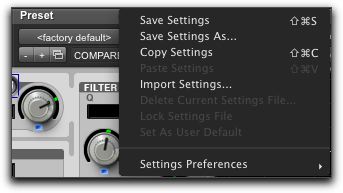
Plug-In Settings Menu
Use the Plug-In Settings menu commands to save, copy, paste, and manage plug-in settings as presets (plug-in settings files).
Plug-In Settings menu
Plug-In Settings menu commands include:
• Save Settings
Saves the current settings. This command overwrites any previous version of the preset.
• Save Settings As
Saves the current settings as a new preset under a different name.
• Copy Settings
Copies the current plug-in settings. You can then apply these settings to the same type of plug-in on a different track by choosing the track in the Plug-In window and pasting the settings with the Paste Settings command.
• Paste Settings
Pastes plug-in settings copied with the Copy Settings command.
• Import Settings
Imports a plug-in settings file (.tfx) from a location other than the Root Settings folder.
• Delete Current Settings File
Permanently deletes the current plug-in settings file (.tfx) from disk.
• Lock Settings File
Prevents the current preset from being overwritten by the Save command. If you attempt to save any changes to the plug-in settings, you will be prompted to save them using a different name or disk location.
• Set As User Default
Defines the current preset as the User Default for the selected plug-in.