Moving and Duplicating Plug-In Inserts
You can move or duplicate an insert by dragging it to a different position on the same track or a different track. Inserts that are moved or duplicated retain their original settings and automation.

Plug-ins cannot be moved or duplicated during recording.
To move an insert:

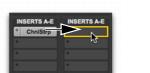
Drag the insert to a new insert location.
Moving a plug-in

Dragging an insert on top of an existing insert will replace it and any automation.
To duplicate an insert:
Option-drag (Mac) or Alt-drag (Windows) the insert to a new insert location. Duplicated plug-in inserts retain their original settings and automation.