Panner Linking
Stereo outputs provide two panning controls, one for each side of the left/right pair.
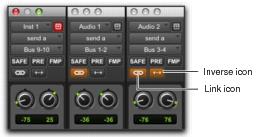
The Output window provides controls to link channels for precise panning of stereo tracks.
In the linked state, all sides match changes to any other side’s Pan control. This is Absolute Link mode. To mirror panning changes, see
“Inverse Linked Panning” on page 773.
When unlinked, Pan controls are completely independent of each other.
Unlinked (left), linked (middle), front inverse linked (right) Send windows
To enable linking:

Enable the Link icon.
To unlink an output for independent panning:
Deselect the Link icon.