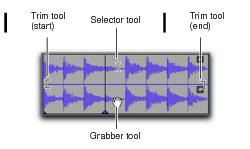
The Smart Tool in Warp View
Smart Tool in Warp view
The following capabilities are available with the Smart Tool when working with Elastic Audio-enabled audio tracks in Warp view, or MIDI or Instrument tracks in Clips view:
• For the Selector tool, position the cursor over the middle of the clip, in the upper half of the clip.
• For the Grabber tool, position the cursor over the middle of a clip, in the lower half of the clip, but not over an Event marker or Warp marker.
• For Elastic Audio warping, position the cursor over an Event marker or a Warp marker, in the lower half of the clip (for more information on warping audio, see
“Editing in Warp View” on page 568).
• For the Trim tool, position the cursor near the clip’s start or end point, in the upper half of the clip.