Using ReWire
The ReWire plug-in is installed when you install Pro Tools. All inter-application communications between Pro Tools and ReWire client software is handled automatically.
To use a ReWire client application with Pro Tools:
1. In Pro Tools, choose Track > New and specify one Instrument track (or audio or Auxiliary Input track), and click Create.
2. In the Mix window, click the Insert selector on the track and assign the ReWire client plug-in to the track insert.
The ReWire client application launches automatically in the background (if the client applications supports auto-launch).

If the client application does not support auto-launch, launch it manually. Some ReWire client applications may need to be launched and configured before launching Pro Tools (such as Cycling 74 Max/MSP). Others may need to be launched after Pro Tools is launched (such as Ableton Live). For more information, refer to the manufacturer’s documentation for your ReWire client application.
3. Configure the ReWire client application to play the sounds you want.
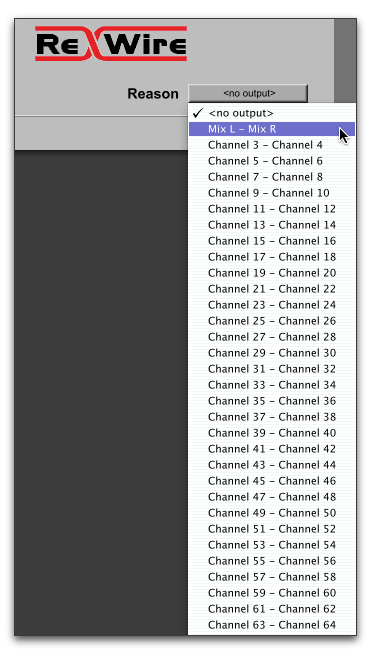
4. In Pro Tools, set the output of the client application in the ReWire plug-in window. This is the audio output of the ReWire client to Pro Tools.
Selecting the audio output from a ReWire client
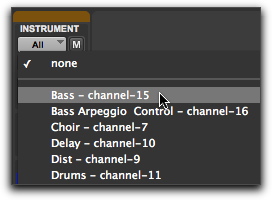
5. In the Mix window, click the track’s MIDI Output selector a and select the ReWire client application. Some ReWire clients (such as Reason) may list multiple devices. If so, choose the device that you want.
Selecting the ReWire client device to receive MIDI from Pro Tools (Instrument track shown)
6. Choose Options > MIDI Thru and record enable the MIDI track. Play some notes on your MIDI controller to trigger the client application. The selected ReWire device responds to MIDI sent from Pro Tools | First and plays back audio through the assigned Pro Tools | First track (Instrument, Auxiliary Input, or audio track).
If your ReWire client application is a sequencer and you want to begin synchronized playback with Pro Tools | First, press the Spacebar or click the Play button on the Pro Tools | First Transport.