ReWire
Pro Tools supports ReWire version 2.0 technology developed by Propellerheads Software. ReWire is available in Pro Tools | First using the ReWire Native plug-in.
ReWire provides real-time audio and MIDI streaming between applications, with sample-accurate synchronization and common transport functionality.
ReWire
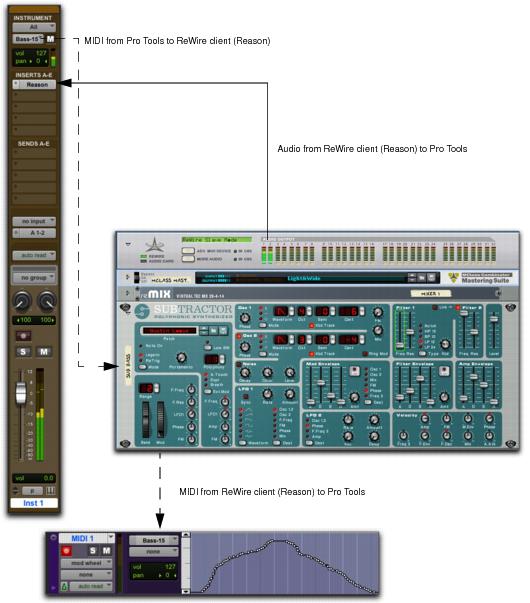
Using ReWire, Pro Tools | First can send and receive MIDI to and from a ReWire client application, such as a software synthesizer, and receive audio back from the ReWire client. Pro Tools | First applies MIDI time stamping to all incoming MIDI.
Compatible ReWire client applications are automatically detected by Pro Tools | First and are available in the Plug-Ins (Native) Insert menus in Pro Tools | First. Selecting a ReWire client application within Pro Tools | First automatically launches that application (if the client application supports this feature). Any corresponding MIDI nodes for that application are available in any Instrument track’s MIDI Output selector (Instrument view) and any MIDI track’s Output selector.
Once the outputs of your software synthesizers and samplers are routed to Pro Tools | First, you can:
• Process incoming audio signals with plug‑ins
• Automate volume, pan, and plug-in controls
• Export Audio Mix
 Pro Tools | First
 does not support sending audio to ReWire client applications.
Not all ReWire client applications support automatic launch from a ReWire-mixer application. For these applications, launch the ReWire client app separately, and then select it as a plug-in insert in
Pro Tools | First.
Exchange of additional metadata such as controller and note names between
Pro Tools | First and ReWire clients is not supported.
Audio and MIDI signal flow between Pro Tools | First and a ReWire client application (Reason shown)