Real-Time Properties View
Real-Time Properties view in the Edit window only applies to tracks. To apply Real-Time Properties to clips, use the Real-Time Properties window (see
“Real-Time Properties Window” on page 406).
To enable Real-Time Properties view in the Edit window:

From the Edit Window View selctor, select
Real-Time Properties.
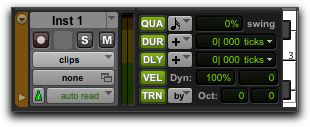
Real-Time Properties column in the Edit window
For Micro, Mini, and Small track heights, the Real-Time Properties column only displays one or two properties, accordingly. The first one or two properties that are enabled are displayed automatically.
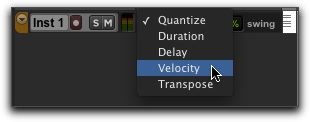
To select a different Real-Time Property in Mini or Small track height view:
Command-click (Mac) or Control-click (Windows) on a real-time property element to select a different element from the pop-up menu.
Real-Time Properties pop-up menu with Mini Track Height