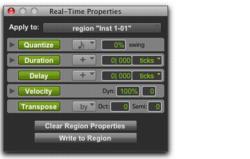
Real-Time Properties Window
Using the Real-Time Properties window, you can apply Real-Time Properties to selected tracks or clips.
To open the Real-Time Properties window:

Choose
Event > MIDI Real-Time Properties.
Real-Time Properties window with properties enabled
The Real-Time Properties window can be used to apply either track-based or clip-based Real-Time Properties by making an Edit selection and selecting tracks or clips from the Apply To pop-up menu.