Tap Tempo
You can manually set the tempo by tapping on your computer keyboard.
To set the Manual Tempo by tapping on a computer keyboard:
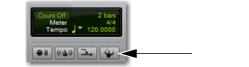
1. In the Transport window or Edit window Toolbar, click the Tempo Ruler Enable (Conductor) button so it becomes unhighlighted. Pro Tools | First switches to Manual Tempo mode. In this mode, any tempo events in the Tempo ruler are ignored.
Tempo Ruler button (unhighlighted), set to Manual Tempo mode
2. Click in the Tempo field so it becomes highlighted and tap the “T” key on your computer keyboard repeatedly at the new tempo.
To compute the new tempo, Pro Tools | First averages the last eight (or fewer) taps to determine the correct tempo. The computed BPM value appears in the Transport Tempo field.
 You can apply the new tempo to the entire project by changing the default tempo of the Song Start Marker. See “Song Start Marker” on page 440.