Restoring a Project from the Cloud
To restore a project from your online MyAvid account cloud storage:
1. In the Dashboard window, select Open to view your current projects (or if Pro Tools | First is already running, choose File > Open to access the Dashboard window.
2. Click the Open tab.
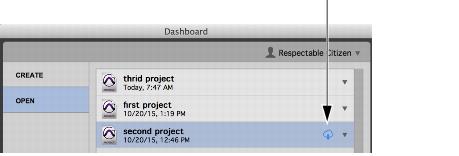
3. To the right of the project list, click the Restore from Cloud storage icon for the project for which you want to open the latest auto-backup.
Dashboard, Restore from Cloud
4. Click the Restore from Cloud icon to the right of the project name.
Pro Tools | First downloads all data from your online MyAvid account cloud storage to the local cache on your system.