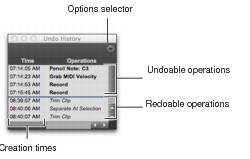
Undo History Window
You can use the Undo History window to view the queue of the undoable and redoable operations and return to any previous state. The Undo History can show edit creation times, enabling you to revert to the state a project held at a particular time.
Undo History Window
To show (or hide) the Undo History window:

Choose
Window > Undo History.
To undo operations in the Undo History window:
Click the operation (bold) in the list to undo.
All operations in the queue that were performed after the operation you select are also undone. In the Undo History window, undoable operations are shown in bold and redoable operations (operations that have already been undone) are shown in italics.
To redo operations in the Undo History window:
Click the operation (italics) in the list to redo.
The operation you choose, as well as all the operations in the queue before it, are redone.
To toggle display of creation times in the Undo History window:
Click the
Options pop-up menu and choose
Show Creation Times.
To undo all the operations in the Undo Queue:
Click the
Options pop-up menu and choose
Undo All.
To redo all the operations in the Redo Queue:
Click the
Options pop-up menu and choose
Redo All.