Opening the Latest Auto-Backup for a Project
To remove the open the latest auto-backup for a project:
1. In the Dashboard window, select Open to view your current projects (or if Pro Tools | First is already running, choose File > Open to access the Dashboard window.
2. Click the Open tab.
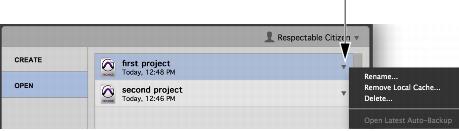
3. To the right of the project list, click the pop-up menu for the project for which you want to open the latest auto-backup.
Dashboard, Open Latest Auto-Backup
4. Choose Open Latest Auto-Backup.
Pro Tools | First opens the latest auto-backup for the project.