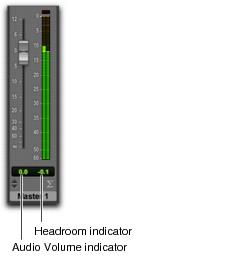
Headroom Indicator
Pro Tools provides a numeric display (in dB) of the available headroom on tracks based on the last registered sample peak level in relation to the reference level. The Headroom indicator is just to the right of the Audio Volume indicator below the faders and meters in the Mix window. Click the Headroom indicator to reset the current value.

Option-click (Mac) or Alt-click (Windows) to reset all Headroom indicators. Shift-Option-click (Mac) or Shift-Alt-click (Windows) to reset the Headroom indicators for only selected tracks.
If the Headroom indicator is displayed in blue, it is measuring below the dB value of the lowest scale marking for the currently selected Meter Type.
Audio Volume and Headroom indicators