AudioSuite Handles
Pro Tools lets you render clips with AudioSuite plug-ins and include “handles” beyond the current edit selection from 0.00 to 60.00 seconds, or even the whole file referenced by the clip. This means that you trim clips out past the rendered selection after processing.
To render a clip with AudioSuite handles:
1. Make the audio selection that you want to render.
2. Select the AudioSuite plug-in you want to use from the AudioSuite menu.
3. Adjust the AudioSuite plug-in options and settings.
4. Do one of the following:

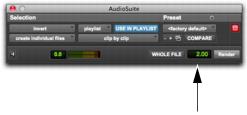
In the Handle Length field, enter a value for the Handle Length (0.00 to 60.00 seconds).
Handle Length field in the AudioSuite plug-in window
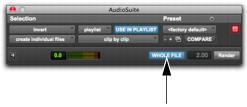
Select the Whole File option to render the whole file. Note that only the current edit selection will appear in the Timeline.
Whole File option selected in the AudioSuite plug-in window
5. Click Render.
The selection is rendered as a new clip whose duration exactly matches the selection. However, the clip can be trimmed out as far as the specified Handle Length.