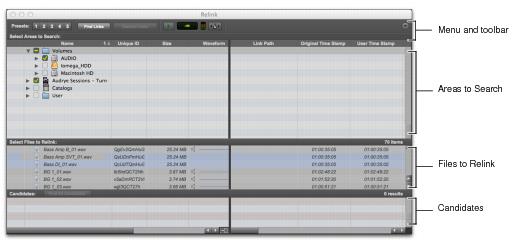
Relink Window
The Relink window provides tools for all relinking tasks.
Main elements in the Relink window
• Menu and Toolbar
Includes the Relink menu, View Presets, and relinking buttons. Status is displayed at the far right.
• Areas to Search
Selects volumes on which to search for missing items.
• Files to Relink
Lists missing files.
• Candidates
Lists files that match the “relinking criteria” for a particular missing file. The Link icon next to the candidate can be toggled on or off to link (or unlink) the proposed candidate to the selected missing file.
The Relink window controls each phase of the relinking process.