Elastic Audio Plug-In Selector
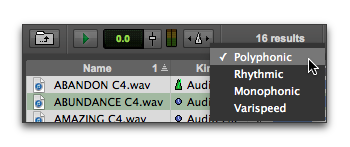
The Elastic Audio Plug-In selector lets you select any Real-Time Elastic Audio plug-in as the default plug-in for previewing and importing Elastic Audio files. Changing the plug-in in any Workspace browser also affects the Elastic Audio Default Plug-In option in the Processing preferences.
To the Elastic Audio plug-in for preview in context:
1. Right-click the Audio Files Conform to Session Tempo button.
2. Select the desired Elastic Audio plug-in.
Workspace Browser, selecting Elastic Audio plug-in for previewing Elastic Audio files.
 For more information, see “Elastic Audio Plug-Ins” on page 562.