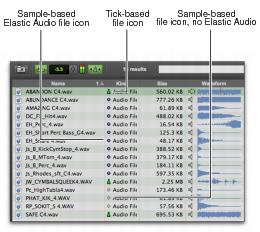
File Timebase and Elastic Audio Analysis Icons
Workspace browsers provide two different icons for time-based or tick-based files. For time-based files, the time-based icon is color coded to indicate whether or not a file includes Elastic Audio analysis.
Elastic Audio and Timebase icons in Workspace browsers
• Sample-Based File Icon
Indicates that the file is sample-based. The icon is color coded to display whether or not the file includes Elastic Audio analysis data. Sample-based WAV and AIF files without elastic audio analysis data display a gray clock icon. Sample-based WAV and AIF files with elastic audio analysis data display a blue clock icon. The file’s duration is displayed in minutes and seconds.
• Tick-Based File Icon
Indicates that the file is tick-based. The file’s duration is displayed in Bars|Beats and the file’s native tempo is displayed in the tempo column. MIDI, REX and ACID files are tick-based and contain their own tempo and Bar|Beat metadata. WAV and AIF files with elastic audio analysis that are tick-based also display a green metronome icon.