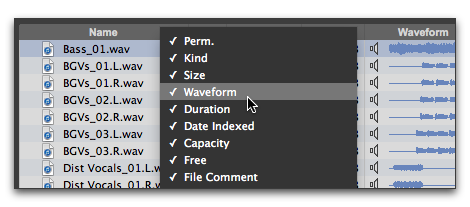
Showing and Hiding Columns
You can show or hide individual columns in Workspace browsers to fit your workflow. The default column display includes the items you would use in most projects.
To show or hide individual columns:

Control-click (Mac), Start-click (Windows), or Right-click a column label and select or deselect the column name from the pop-up menu.
Showing and hiding columns

Command-click (Mac) or Control-click (Windows to select or deselect multiple items in the pop-up menu.
To show or hide all columns:
Control-click (Mac), Start-click (Windows), or Right-click a column header and choose
ALL or
NONE from the pop-up menu. (Only the Name column remains when you choose
NONE.)
To show the default set of columns:
Control-click (Mac), Start-click (Windows), or Right-click a column header and choose
DEFAULT from the pop-up menu.