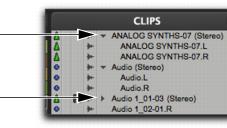
Stereo Clips in the Clips List
Stereo clips, whether imported or recorded, are displayed as single items in the Clips List. For example, two mono source clips named “Main Piano.L” and “Main Piano.R” are listed as “Main Piano (Stereo).” An expand/collapse triangle indicates stereo and multichannel clips.
Stereo clips are displayed in the Clips List by default in collapsed view. The individual clips can be displayed by clicking the arrow to the left of the clip to expand the name.
Stereo clips, expanded (top) and collapsed (bottom)
To expand or collapse all stereo and multichannel clips:

Press Option (Mac) or Alt (Windows) while clicking the expand/collapse triangle.
Individual items of an expanded-view stereo or multichannel clip can be selected independently of the other associated clips in the Clips List.