Changing Track Height
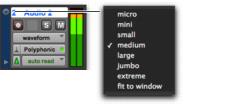
To set the Track Height, do one of the following:

Click the small arrow to the left of the Track name to get the
Track Height pop-up menu.
Track Height pop-up menu
Right-click on the vertical zoom scale just to the right of the track controls and choose the height from the pop-up menu.
The track is resized to the new height. If the track is part of an Edit Group, all tracks in the group are set to the new height.

Press Control+Up/Down Arrow key (Mac) or Start+Up/Down Arrow key (Windows) to increase/decrease track height of any track that contains a selection or in which the edit cursor is currently placed.