Tracks : Setting Track Views in the Edit Window
Setting Track Views in the Edit Window
To set the Track View:

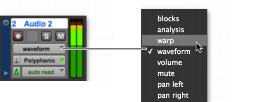
Click the Track View selector for the track and select the view from the pop-up menu.
Track View selector (stereo audio track shown)
The track displays the new view. If the track is part of an active Edit Group, all tracks in the group are set to the new view.