Selecting Takes
To select the various record takes:
2. Do one of the following:

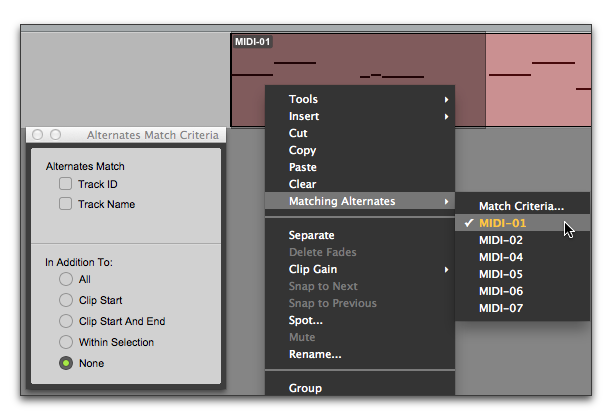
Right-click the clip with the Selector or Grabber tools, and select a take from the Matches submenu in the pop-up menu.
Selecting an alternate MIDI take
With the Selector tool, Command-click (Mac) or Control-click (Windows) at the precise beginning of the loop or punch range and select a different take from the Alternates pop-up menu.
If the take currently residing in the track is selected, with the Selector tool, Command-click (Mac) or Control-click (Windows) anywhere on the selected take and select a different take from the Alternates pop-up menu.
The selected take (clip) replaces the previous take and snaps precisely to the correct location.
 For more information on auditioning and managing takes, see “Selecting Alternate Takes” on page 238.