Enabling Input Devices
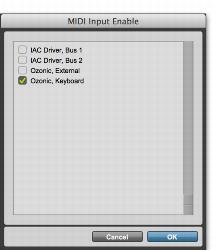
To record from a MIDI device (such as a MIDI keyboard) in Pro Tools, the device must be enabled in the MIDI Input Enable dialog. You can also use this dialog to make sure unwanted notes from certain devices, such as drum machines or arpeggiators, are not recorded.
To enable input devices:
1. Choose Setup > MIDI Input Devices.
2. Select the MIDI devices you want to record.
3. Deselect any input devices you want to ignore while recording MIDI.
MIDI Input Enable dialog

Devices do not need to be selected to receive MIDI data from Pro Tools | First. For example, a device used exclusively as a sound module does not need to be selected in the MIDI Input Enable dialog.
4. Click OK.