Record Modes and MIDI
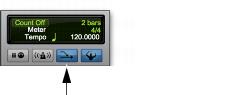
In addition to the various record modes, there is also a MIDI Merge button in the Transport window or the Edit window Toolbar that determines how MIDI is recorded. When enabled (Merge mode), recording over existing MIDI clips results in the new data being merged with the old. When the MIDI Merge button is disabled (Replace mode), the new material replaces the old.
MIDI Merge button, enabled
QuickPunch does not need to be enabled to punch on-the-fly with MIDI—this capability is available in Normal Record.
Unlike audio loop recording, the state of the MIDI Merge toggle determines whether existing material is replaced or merged.
Unless MIDI Merge is enabled, MIDI recording is destructive (though you can undo a MIDI record pass), either overwriting or adding to clip material. One exception to this rule is when Loop Record mode is enabled; in this mode, existing track clips are replaced with new clips when new material is recorded. The old clips remain intact and available from the Clips List, and from the Matches pop-up menu. In Loop Record mode, MIDI Merge has no effect, so its button is dimmed.