Dynamic Transport Mode
Dynamic Transport mode lets you decouple the playback location from the Timeline selection. This means that you can start playback from anywhere on the Timeline without losing your selection. For example, you can use Dynamic Transport mode in conjunction with Loop Playback mode to quickly audition loop transitions.
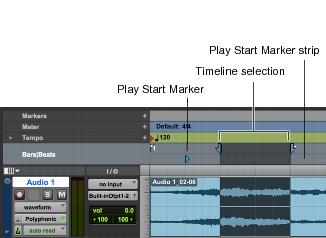
When Dynamic Transport mode is enabled, the Main Timebase ruler expands to double-height and reveals the Play Start Marker. The Play Start Marker determines where playback starts when the Transport is engaged. You can position the Play Start Marker independently of the Timeline Selection. The Play Start Marker can be repositioned during playback and playback continues from the new location.
To enable or disable Dynamic Transport mode, do one of the following:

Select or deselect
Options > Dynamic Transport.
Right-click the Play button in the Transport window and select
Dynamic Transport from the pop-up menu.
Press Command+Control+P (Mac) or Control+Start+P (Windows) to toggle Dynamic Transport mode on or off.
Dynamic Transport mode, Play Start Marker shown in expanded Main Timebase ruler