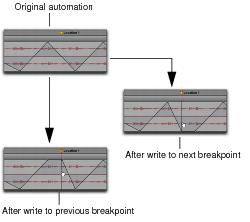
Constraining New Breakpoints to the Next or Previous Automation Value
New automation breakpoints can be constrained and written to the same value as the next or previous breakpoint.
Constraining and writing new breakpoints
(at Marker 1)
To write a new breakpoint to the next automation value:

Hold Option+Shift (Mac) or Alt+Shift (Windows) while writing a breakpoint (by clicking with any Grabber tool in an automation track view or lane).
To write a new breakpoint to the previous automation value:
Hold Command+Option (Mac) or Control+Alt (Windows) while writing a breakpoint (by clicking with the Grabber tool in an automation track view or lane).

The Smart Tool cannot be used to write a new breakpoint to the next or previous automation value.