Nudging Clips Adjacent to Crossfades
When you nudge either of the clips that contributes to a crossfade, the fade stretches to preserve the relative position of the crossfade start and end points. The amount of stretch depends on the amount of overlap between the contributing clips.
If you nudge a clip beyond the boundary of available audio for the crossfade, the fade is removed.
To nudge a clip and stretch its crossfade:
1. Use the Grabber tool to select one of the contributing clips to the crossfade.
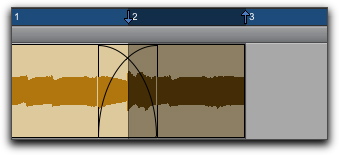
Selecting a clip with a crossfade
2. Nudge the clip by pressing Plus (+) or Minus (–) on the numeric keypad.
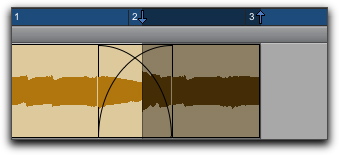
Stretching the crossfade by nudging