Dragging Clips to and from Stereo and Multichannel Tracks
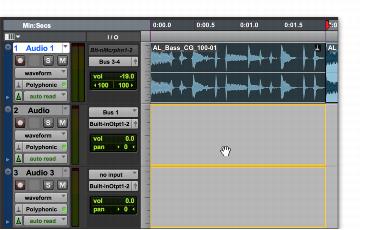
Dragging a stereo clip to two mono audio tracks
When dragging clips to or from stereo tracks, the following rules apply:
• Provided the number of tracks and channels are the same for the source and destination, you can drag clips between stereo tracks and mono tracks.
• When dragging stereo clips to mono tracks, the destination tracks must be adjacent.
• When dragging clips from mono tracks to a stereo track, the source tracks need not be adjacent.
Stereo clips can also be dragged from the Clips List, to stereo tracks of the same format or a pair of mono audio tracks.
Conversely, pairs of single, mono clips can be dragged from the Clips List to stereo tracks.