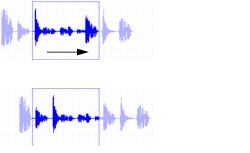
Nudging the Contents of a Clip
Often a clip’s start point will reside at the correct location, perhaps at a barline, but the material within the clip starts too late or early. You can, in effect, nudge a clip’s audio waveform or MIDI notes without displacing the clip start and end points.
Nudging clip contents without changing clip boundaries
This “sliding” of clip contents is only possible if there is material residing outside the clip’s start and end points—from the clip having been trimmed, or perhaps captured from a larger clip.
To nudge the contents of a clip without changing the clip start and end points:
2. With the Grabber tool, select the clip whose contents you want to nudge.
3. While pressing the Control (Mac) or Start key (Windows), press Plus (+) or Minus (–) on the numeric keypad to move the material by the Nudge value.