Normal Zoomer Tool
To zoom around a certain point in a track:
1. Do one of the following:

Click the Zoomer tool pop-up menu and select Normal Zoom mode.
Zoomer tool
Right-click on any track and select
Tools > Zoomer Tools > Normal Zoom.
2. Click once with the Zoomer tool at a location within the track. All tracks are zoomed in by one level and the Edit window is centered around the zoomed location.
3. To zoom back to the previous level, Option-click (Mac) or Alt-click (Windows) with the Zoomer tool.
To zoom into a particular track area:
1. Do one of the following:
Click the Zoomer tool pop-up menu and select Normal Zoom mode.
Right-click on any track and select
Tools > Zoomer Tools > Normal Zoom.
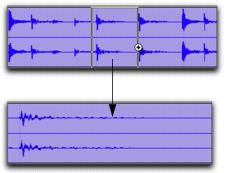
2. Drag with the Zoomer tool in the track.
Zooming horizontally with Zoomer tool
The zoomed area fills the entire Edit window.