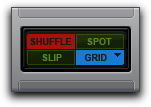
Snap To Grid
Pro Tools lets you enable Snap To Grid while in Shuffle, Slip, or Spot mode. When in any of these modes with Snap To Grid also enabled, placing the Edit cursor and making Edit selections is constrained by the Grid, but any clip editing is also affected by the other selected Edit mode.
For example, in Shuffle mode, with Snap To Grid enabled, you can make a selection in a clip based on the Grid, cut the selection, and any clips to the right of the edit shuffle to the left.
Shuffle mode with Snap To Grid enabled
To enable Snap To Grid while in another Edit mode:

Shift-click the Grid mode button.

Press Shift+F4 to enable Snap To Grid while in another Edit mode.
To enable Shuffle, Slip, or Spot while in Grid mode:
Shift-click the Shuffle, Slip, or Spot mode button.
Press F1+F4 to enable Snap To Grid and Shuffle mode; press F2+F4 to enable Snap To Grid and Slip mode; and press F3+F4 to enable Snap To Grid and Spot mode.